My Database Migration Pipeline Went Green While Hiding a Bug: Building an Approval-Gated Azure SQL Deploy
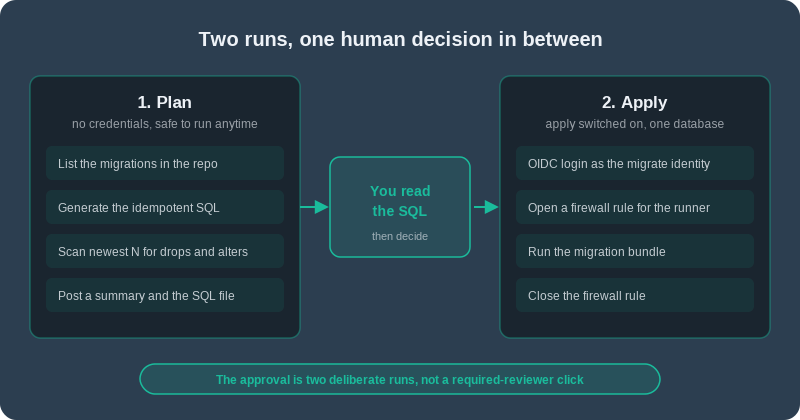
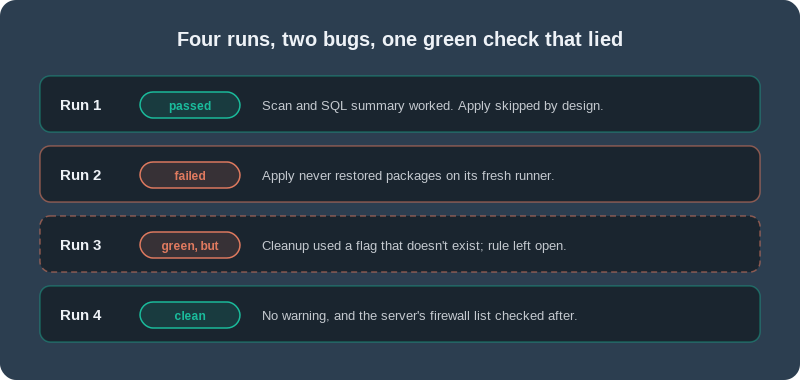
Above: the two-run flow (a credential-free plan, a human reading the SQL, then apply) and what each of the first four runs actually caught.
Until now, every schema change to my live .NET app went the same way: generate a SQL script, paste it into the Azure Portal's Query editor, and compare the migration history table against the script by eye. It worked, and it made me a little nervous every time. So I replaced it with a GitHub Actions pipeline where nothing touches a database until I've read exactly what will run. The first fully green run still hid a bug, and that bug taught me more than the design did.
The Process I Was Replacing
The app has two databases, one for public lead intake and one for a private personal ERP, each with its own EF Core migrations. The old routine was dotnet ef migrations script, open the Portal, paste, run, then eyeball __EFMigrationsHistory to make sure I hadn't skipped or repeated anything. Nothing about it was wrong, exactly. It just depended entirely on me being careful at the moment I was most likely to be tired.
The Design: Two Runs With a Human in Between
The workflow is manual-dispatch only. The first run, plan, uses no credentials at all. It lists the migrations in the repo, generates the idempotent SQL script, scans the newest few migrations for drops, alters and raw SQL, and writes all of it to the run summary with the SQL attached as a file. The second run is the same workflow dispatched again with an apply input switched on. It logs in to Azure, opens a temporary firewall rule for the runner's IP, runs a migration bundle (dotnet ef migrations bundle) against one database, and closes the rule. The database is a dropdown input, so a single run can never touch both.
What I wanted was GitHub's required-reviewers gate on the deployment environment. It isn't available on a private repo on the free plan, and I checked the settings page rather than assuming. So the approval became two deliberate runs: read the plan, then run apply. That's a weaker control than a second person, and I'm not going to pretend otherwise. For a one-person app it still forces the habit that matters, which is looking at the SQL before it runs.
Least Privilege, Spelled Out
- No stored password. The workflow logs in with OIDC federation, so there's no client secret sitting in GitHub.
- A separate identity for migrations. The deploy identity was narrowed to Website Contributor on the web app, and a second identity, used only by this workflow, handles the database.
- A custom role instead of a broad one. The migration identity can read the SQL server and create, read and delete firewall rules, and nothing else. I wrote that as a custom role rather than handing out SQL Server Contributor.
- The login is fenced to one environment. The GitHub environment is limited to the
masterbranch, and its secret is what selects the migration identity, so a workflow on any other branch can't use it. - Database-side permission. Azure roles only get the runner through the firewall. Changing schema also needs a database user, which I created in each database.
Testing the Scan Before Trusting It
The destructive-change scan looks for AlterColumn, drops and raw SQL in the Up() method of each recent migration, and deliberately ignores Down(), since a rollback's drops aren't what I'm guarding against. My first version reported "none found" for a migration that does contain AlterColumn. I only noticed because I ran it against a migration I already knew was not purely additive. A safety check that says all clear by default is worse than no check, so I now test it against a known-bad case before I trust it.
Where It Went Sideways
I ran the real pipeline four times on one Sunday. The first, plan only, passed. The next three are the interesting ones.
- Run 2 failed before it reached Azure. The bundle step died with
NETSDK1004, unable to findobj/project.assets.json. The plan job restores packages, but the apply job runs on a fresh runner and never did. My local test of the same command had passed only because my machine was already restored. I reproduced the exact error in a clean checkout, added adotnet restorestep, and watched the bundle build. - Run 3 went green and was wrong. It logged in, opened the firewall, connected, and correctly reported no migrations pending. Then I opened the log of the cleanup step. The command that deletes the temporary firewall rule had failed with
unrecognized arguments: --yes, because that Azure CLI command has no such flag. The step ends with|| echo "::warning::...", so a failure wouldn't fail the job. The job stayed green and a rule letting a GitHub runner's IP reach my SQL server stayed on it. I only saw it because I read the log of a run that said Success. I removed the flag and deleted the rule by hand. - Run 4 was the real check. It ran against the second database with no warning, and afterward I listed the server's firewall rules to confirm the temporary one was gone instead of trusting the badge.
A warn-instead-of-fail fallback is a reasonable choice for a cleanup step, because you don't want cleanup to mask the real error. But it only works if someone reads the warnings, and a green check doesn't tell you there were any.
What I'm Accepting on Purpose
- No second reviewer. The gate is me, twice. That fits the size of this app and is the first thing I'd change on a team.
- Applying a real change is still unproven. Both databases were already up to date, so every apply run ended with "No migrations were applied." That proves the login, the firewall handling, the connection and the bundle. It does not prove applying an actual schema change. The next real migration is that test, and I'll read its plan summary very carefully.
- Deploys don't depend on migrations yet. A code deploy can still go out ahead of its schema change. It's on my list, not done.
The Takeaway
The design was the easy part. What taught me something was that a green check and a correct result were two different things, twice: a test that passed because my machine was already set up, and a job that passed while quietly leaving a hole. If you build something like this, run it end to end in the real environment as early as you can, read the logs of the runs that pass, and check the world afterward, like the firewall list, not just the badge.
I build custom business software and ERP-style systems for small organizations, and I'm based in the Chicago area. If that's what you need, the details are on my consulting page.
Questions & answers
How do you add an approval gate to a database migration pipeline without GitHub required reviewers?
Split it into two manual runs of the same workflow. The first run, plan, uses no credentials and prints the exact SQL and a scan for destructive changes. The second run has an apply input switched on and is the only one that logs in to Azure. Nothing reaches the database until you have read the plan and dispatched the second run on purpose.
How do you apply EF Core migrations from GitHub Actions to Azure SQL without a stored password?
Log in with OIDC federation so no client secret is stored, then build a migration bundle with dotnet ef migrations bundle and run it with Authentication=Active Directory Default. The runner opens a temporary firewall rule for its own IP and closes it afterward. Give the identity a narrow custom role for firewall rules, plus a database user with schema-change rights in each database.
Why did my GitHub Actions job pass when one of its steps failed?
A step that ends with || echo or any other fallback exits successfully even when its command fails, so the job stays green. In this pipeline the firewall cleanup failed on a flag that does not exist and left a rule open. Read the annotations and step logs of passing runs, and check the real side effect afterward, such as listing the firewall rules.