I Security-Reviewed My Own Deployed App: Cheap Wins, a Key Vault Migration, and What I Chose Not to Fix
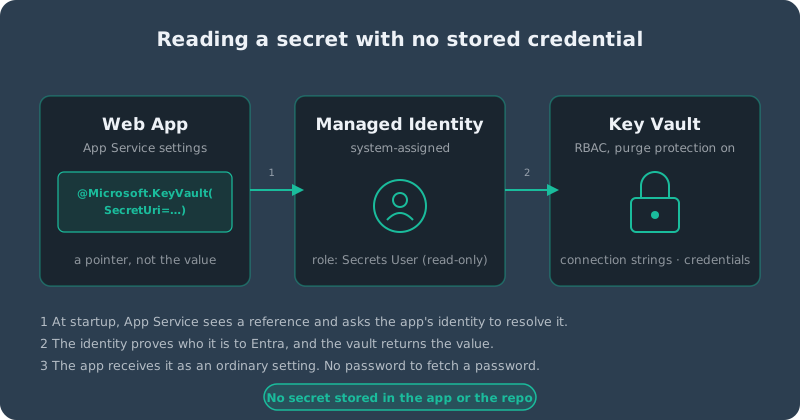
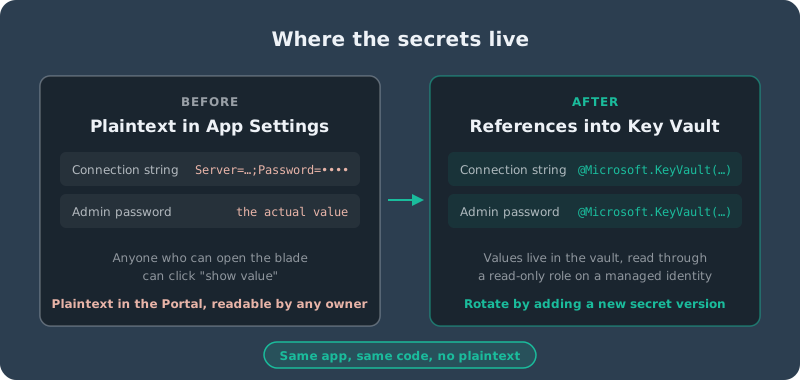
Above: how the web app reads a secret without storing a credential, and where the secrets lived before and after the migration.
I build custom business software, so protecting sensitive data is supposed to be in my wheelhouse. Then I looked honestly at my own deployed app — a .NET intake backend holding real leads and a private client pipeline, live on Azure — and realized I'd done a lot of security design and very little security verification. This is what I found, what I fixed, and what I deliberately chose not to fix.
Right-Sizing the Threat Model
The tempting move is to reach for enterprise tooling: a WAF, a SIEM, pen-testing suites. For a solo-operator app with a small public form, that's security theater. The realistic threats are boring: opportunistic bots hitting public endpoints, credential stuffing against the admin login, a secret leaking through an accidental commit, and a vulnerable NuGet package nobody noticed. So the plan was to close the cheap, real gaps and write down, explicitly, what I was accepting instead.
The Cheap Wins (and Two Embarrassing Findings)
- Dependency alerts were off. GitHub's Dependabot vulnerability alerts and automated security fixes were both disabled on the repo. Two toggles, and a whole class of risk went from unmonitored to monitored.
- A stale doc, not a stale defense. My own plan said CSP
script-srchardening was still deferred. It had actually shipped days earlier. The code was right; the notes were wrong. Docs drift too, and a review is a good excuse to catch it. - Secret scanning in CI. A gitleaks job now scans every push and pull request, so keeping secrets out of the repo no longer depends on my remembering to.
- A memory alert. The shared App Service plan was sitting near 79% memory with only a CPU alert watching it. Now memory has one too.
Testing the Lockout Instead of Trusting It
I'd ported login lockout and rate limiting from another project and never actually tried to trip them against the real login. So I did. Repeated bad passwords produced Identity's per-account lockout, and then a follow-up attempt with the correct password was still rejected by the per-IP rate limiter — a valid credential doesn't bypass an active lockout. After the window expired, the right password signed in normally. Both layers behaved as designed. No bug, no code change — but now it's a verified fact instead of an assumption.
The Big One: Moving Secrets into Key Vault
Connection strings and the bootstrap admin credentials lived in App Service's Application Settings. Not in the repo, but still plaintext in a Portal blade. I moved them to Azure Key Vault, read through a Managed Identity, so the app never holds a stored credential to fetch its own secrets.
There are two ways to wire this up: a configuration provider in code, or Key Vault references in App Settings. I chose references. My plan tier supports them, it needed no code change and no new dependency, and App Service resolves them itself. Each setting's value becomes a pointer like @Microsoft.KeyVault(SecretUri=…), with no version, so the app always gets the latest one.
The build, in order: create the vault with the RBAC permission model and purge protection on; turn on a system-assigned identity for the web app; grant that identity Key Vault Secrets User (read-only) and myself Secrets Officer; add the four secrets; then swap the settings over. I migrated one low-risk setting first as a test before touching the connection strings. The Portal's green "Key vault reference" check confirmed resolution, and I confirmed the real thing by logging in and loading pages backed by both databases.
Where It Went Sideways
- A stale Portal token. My first role assignment failed with a uselessly generic error, and the access-control view complained about a "passthrough token." Nothing was wrong with my resources — signing out and back in fixed it.
- Almost the wrong role. The assignment wizard was about to give the web app Secrets Officer (read and write) instead of Secrets User (read). I caught it on the review screen. Least privilege is easy to violate by one dropdown.
- Two different object IDs. The vault's role list showed a different ID than the app's Identity page for the same app. Rather than guess, I checked from the identity's own role-assignments view, which confirmed the role was attached correctly.
What I'm Accepting on Purpose
The vault keeps a public endpoint, protected by role-based access and Entra authentication rather than network isolation. A private endpoint would add cost and complexity that this threat model doesn't justify. I'm also not adding a WAF, a SIEM, or a bigger Azure tier for security headroom. If the sensitivity of the data ever changes, that's the trigger to revisit — not before.
The Takeaway
The most valuable results weren't the fancy ones. They were two switches that were off, a lockout I finally tested, a stale note, and one role I almost got wrong. A security review of your own system is mostly about replacing "I'm pretty sure" with "I checked," and writing down what you decided to leave alone.